
Visualizing Results#
There are several ways of viewing the results of Ewoks3DXRD processing
Viewing results in ewoks-canvas#
Each workflow task has a plot showing the results. The path to the results can be saved by saving the workflow after the task has finished.
Reloading the workflow will reload the results for each task and produce the output plots for visualization.
Viewing results (except grain maps) from the HDF5 file#
Results are saved in an HDF5 file in a NeXus format.
This allows HDF5 visualization tools such as silx view or myHDF5 to produce plots when exploring the different groups.
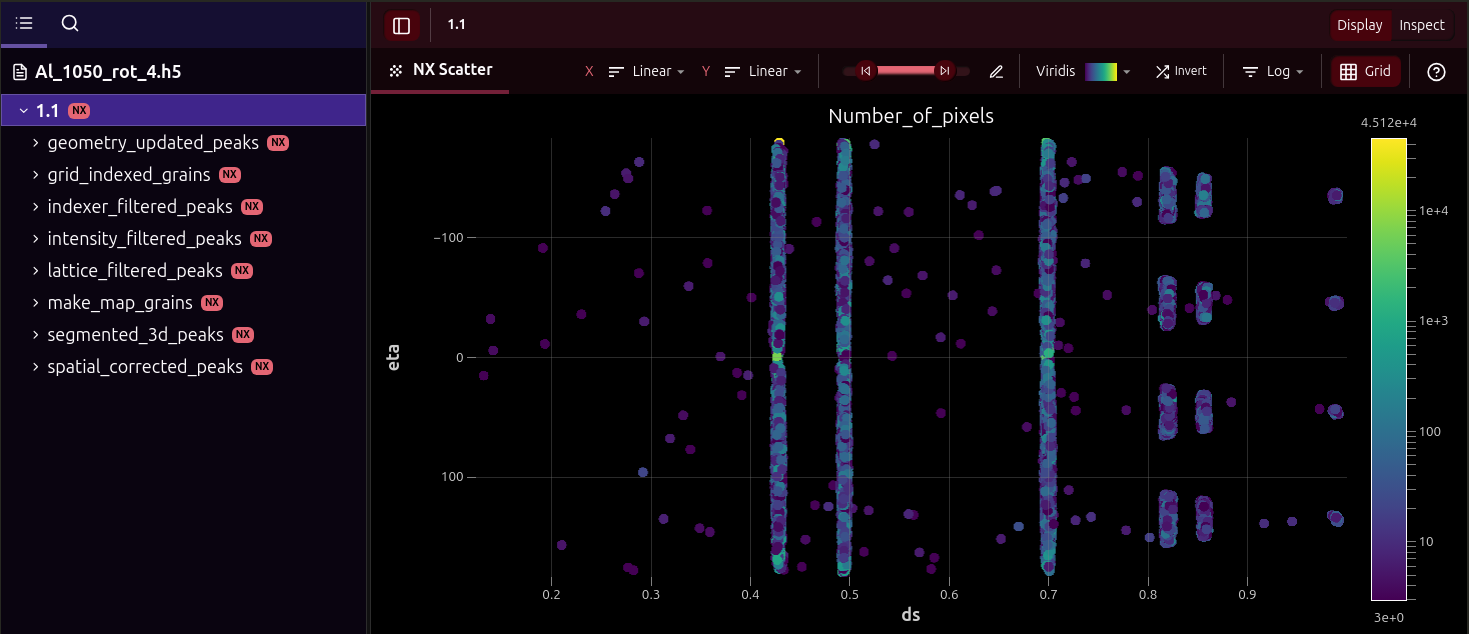
For example, you can use silx view by opening your terminal and running:
silx view /path/to/your/processed_data.h5
Navigate to the entry (e.g. 1.1) and find the process group (e.g. lattice_filtered_grains) to visualize the results for this step.
Warning
Unfortunately, HDF5 viewers cannot produce 3D plots of grain maps for the process groups grid_indexed_grains and make_map_grains.
See the next section about ewoks3dxrd-grain-vis for this.
Viewing grain maps with ewoks3dxrd-grain-vis#
ewoks3dxrd provides a custom command-line utility ewoks3dxrd-grain-vis to produce the 3D plots of grain maps produced by the Grid Indexing and Refine Grain Mapping tasks.
To use it, run
ewoks3dxrd-grain-vis /path/to/your/processed_data.h5
By default, this will plot the results contained in /1.1/make_map_grains. You can change the scan entry and process group by supplying command-line arguments:
ewoks3dxrd-grain-vis /path/to/your/processed_data.h5 --entry 2.1 --group grid_indexed_grains
You can run ewoks3dxrd-grain-vis --help for more info on the --entry and --group arguments:
Visualize grains contained in a Ewoks3dxrd NeXus file
usage: ewoks3dxrd-grain-vis [-h] [-e ENTRY] [-g GROUP] filename
Positional Arguments#
- filename
File containing the Ewoks3dxrd results
Named Arguments#
- -e, --entry
Name of the scan entry (x.y). Defaults to 1.1
Default:
'1.1'- -g, --group
Name of the process group. Defaults to make_map_grains
Default:
'make_map_grains'